

My thoughts on using a task manager (one year later)
I have experimented with various task tracking methods over the years. Here is what continues to work when the rest flopped.


Recently, it had occurred to me that a full year has passed since I started using a task manager. I thought it would be interesting to reflect on the evolution of how I manage what I need/want to do and share where I am today versus when I first set up the system I’m presently using. Not only has it helped me keep personal and work tasks on my radar; it has enabled my hobbies to continue progressing at a satisfying pace. With this context established, here are my thoughts on using a task manager (one year later).
How I Handled Task Management Before
From 2020 into 2025, there are a couple primary processes I used for tracking what I needed and wanted to do in any given day. I will explain and show what those looked like, along with why I chose not to keep with those processes long-term.
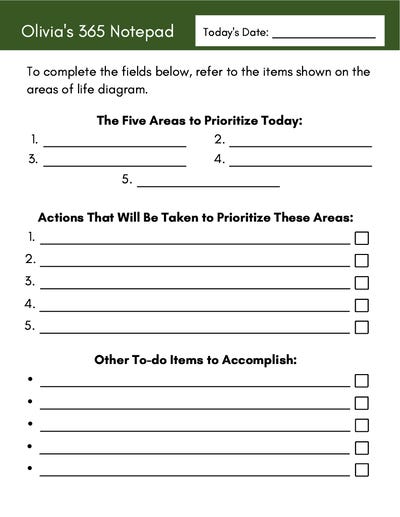
Process #1: Custom Daily Tear Sheets
The first task management process I had used was writing tasks on a custom daily tear sheet. This tear sheet included a section for the areas of life I wanted to focus on, tasks to support these areas of life, and other tasks to complete. While my preference is to use more analog methods whenever possible, daily task tracking with these tear sheets did not ultimately work for two reasons.
Firstly, there seemed to be a level of pressure to fill as many lines as possible every day. This created unnecessary, self-perceived pressure to do as much as possible all the time and took the fun out of spontaneous hobbying since everything was pre-planned and something to check off the list. Secondly, it was more difficult to plan further out in advance with these tear sheets. Perhaps I could have kept a handwritten master task list to pull a few-week-out tasks from, but as that list grows, it would become more difficult to manage and unsortable since it’s handwritten. I could only sustain this process for a couple years before realizing there was probably a better way.
Process #2: Tabled Excel Sheet
The next process I used for task tracking was with Excel. I set up a lean excel table that included a task category, project, task description, due date, and completed box to sort and filter by. It is important to note here that I quit tracking which personal activities I wanted to get around to in any given day; this sheet was only for tasks.
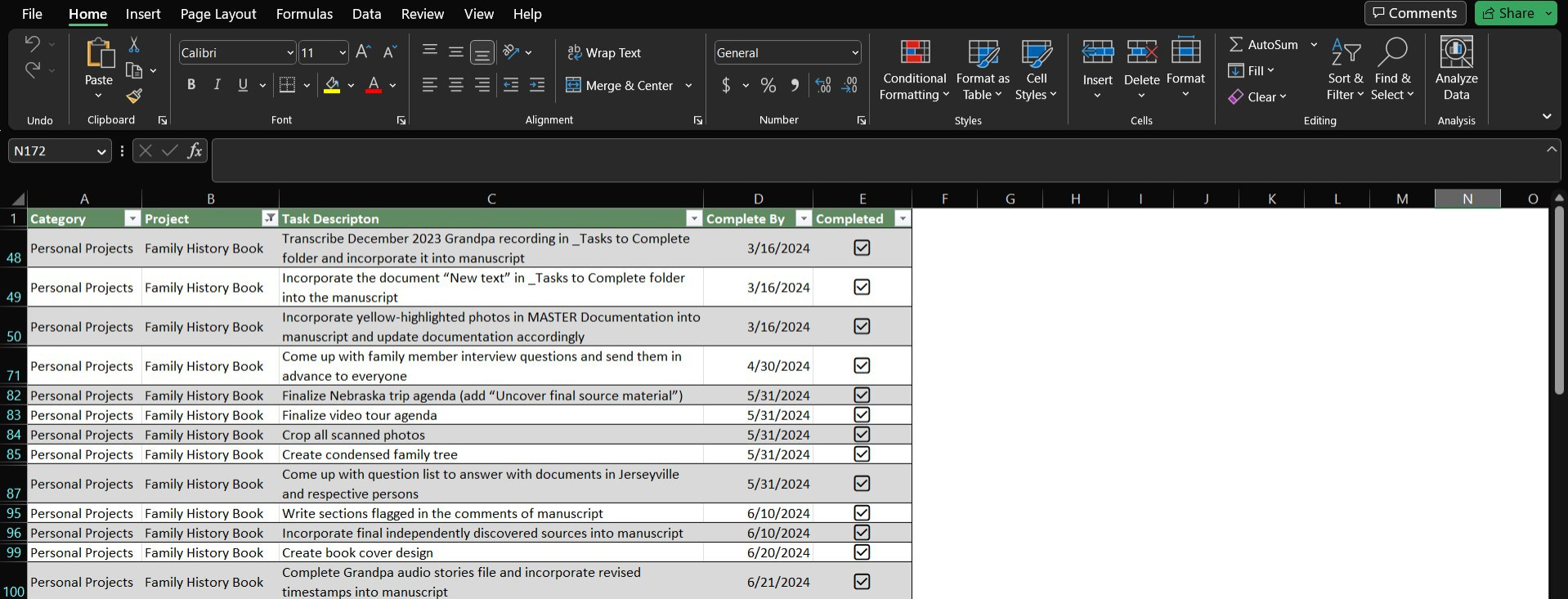
With this Excel process, I was able to map out every step I needed to complete for two major projects I saw from beginning to end. So, in that respect, you could say this Excel process worked. However, what it lacked was a more visual way of spacing out my workload and integration with my calendar for a more holistic view of everything I had going on for the day, week, and month ahead. That then brought me to…
How I Handle Task Management Now
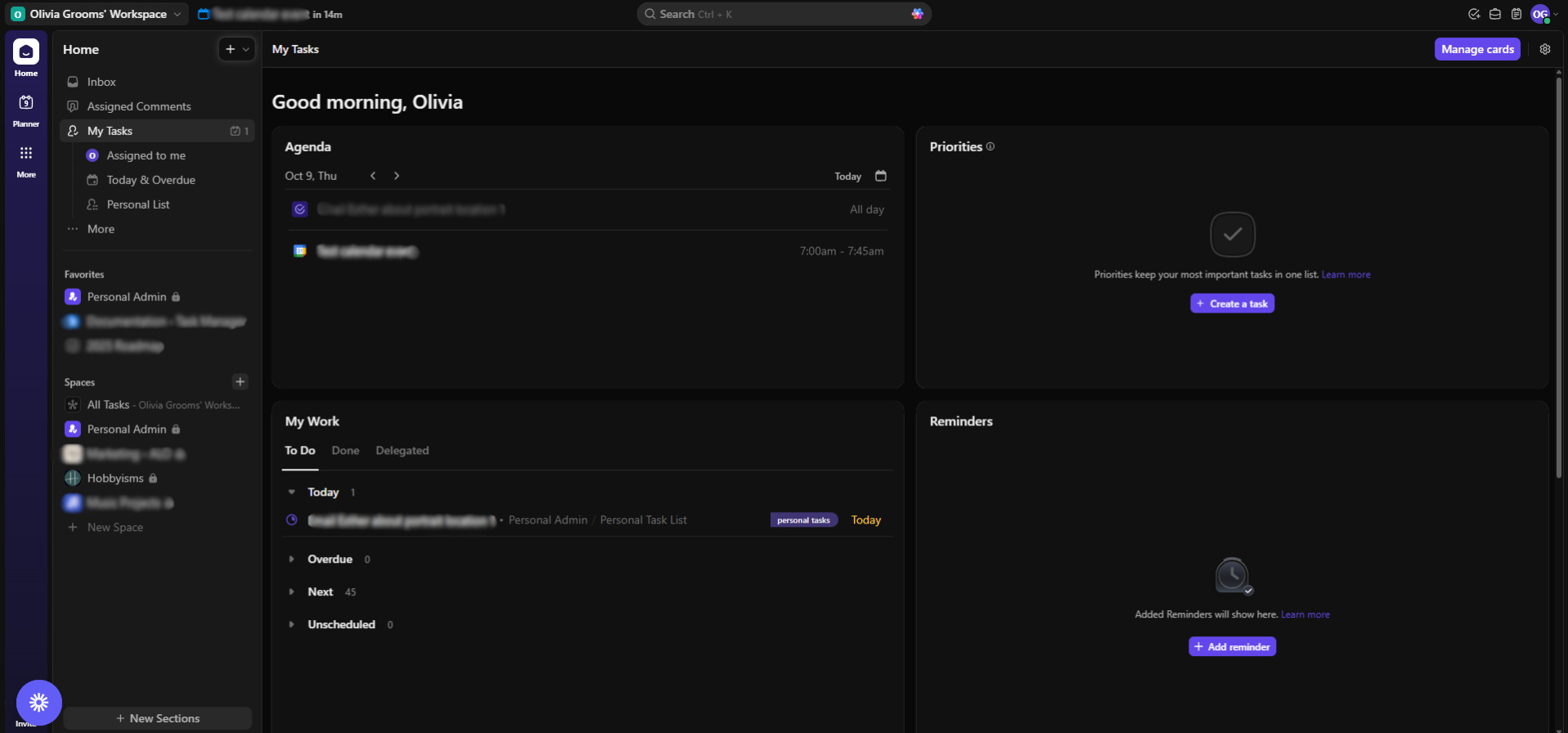
In January 2025, I thought it was time to reevaluate how I handle my workload and workflows. So, after asking for a recommendation from a trusted person I work with and doing some independent research, I landed on Clickup. I didn’t know it at the time, but this decision marked the beginning of a whole new way of managing my life.
The first tasks I entered into Clickup came from the Excel sheet I was working from prior, and I archived that Excel sheet from that point forward. It wasn’t until April 2025 until I took some time to plan a month or two out in advance. This I did whilst watching Nancy Drew and The Hardy Boy’s The Mystery of Witches’ Hollow (1977). This has nothing to do with it other than the fact than this is the exact moment I started planning for months ahead.
As the year progressed, I continued refining my Clickup configuration and bolting on features necessary to how I administrate my life. Some examples include integrating my calendar into Clickup, implementing an optional time blocking reporting mechanism, and setting up a panel where I could save notes, links, and videos to review later. It took a while to get my Clickup configured exactly how I wanted because it took several months to understand where I was getting stuck to then adjust my Clickup around these parameters. A year later from when I initially dove in, though, I have reached full contentment with this system and have proved its effectiveness time and time again.
As of today, I have tasks planned several months out for 2026 and some planned for the next couple years. This happened unintentionally over a period of time as I brainstormed across several different sessions and made my ideas actionable in my task manager. I plan to continue adding to my task lists whenever new ideas emerge and adjust task due dates as needed. It makes more sense to enter all known tasks into Clickup (even if they’re further out) rather than leaving these tasks on the table. That way, I have a more complete understanding of what needs to happen and then figure out how to make it happen.
There are some changes I’ve made to my Clickup since the original posting of my setup, but if you’d like to see how it’s configured overall, you can review my post How to Optimize Your Life for Sustaining Hobbies.
Lessons Learned
After one year of using a task manager, there are some core lessons I’ve learned along the way that are very much applicable to others as well. Here’s what those include.
It’s okay to have a long (if not a very long) list.
Not everything on your list needs to be checked off. In fact, it’s better that there are open items to complete. This means you have an understanding and plan for your next steps. If everything was checked off, what would you do next? The key is to keep your open items in rotation, meaning you are checking items off and adding new items to the list. The moment your list goes stagnant, your progress also goes stagnant.
Fun fact: I currently have 88 personal tasks and 258 work tasks pre-scheduled. The next steps are very clear!
Learn what doesn’t work until you learn what does.
Keep iterating and experimenting various approaches. The quicker you learn what doesn’t work, the quicker you learn what does. This is what I keep in perspective when refining processes and outcomes several times over.
Seek the best solutions to challenges, even if requires some learning.
When coming up with solutions, think in terms of good, better, and best. Good requires little to no learning but requires the most admin overhead. Better requires some learning and some admin overhead. Best requires more learning but the least (if none) admin overhead. Choose the “best” approach, even if it’s more difficult in the present. You will thank yourself in the future.
Final Thoughts
It took a substantial amount of time and effort to make my task management system everything I wanted to be, but all these refinements were super worth it. At this juncture, I have more time to focus on what I’d rather be doing (while still getting done everything I need to and then some) because all the core aspects of my life are systematized. And I have found that sound task and time management very much contribute to peace of mind, among many other factors as well.
I hope that, through my own trial and error, you found something actionable from this post to help simplify your own life and get around to your hobbies. If that is the case, let me know what that is; I’d love to hear it. More interesting hobby topics and updates are on the way, so be sure to stay tuned.
Happy hobbying!
This is cool! I use ToDoist for my longterm management of task but then I use some handwritten stuff too because the handwritten also helps my memory so I'm having to check the list less. THis way I handwrite out my daily tasks in the morning on a sticky note pulled from my master list in todoist